
How to detect buyer signals in sessions (before they add to cart)
Learn how to read real buyer intent before add-to-cart actions. See the signals that predict conversions and how Helium scores every session in real time.

Most ecommerce teams treat “Add to Cart” as the first sign of intent. But by the time a shopper reaches that point, they’ve already made most of their decision.
Real intent starts much earlier in the session. It’s the visitor who scrolls quickly through irrelevant products but slows down when they reach a specific price range. It’s in the person who reopens the same PDP after comparing a few others, or checks the return policy twice. Those are stronger buying signals than any cart action because they reveal why someone is close to converting, not just what they clicked.
In this piece, we’ll look at how to detect those pre-cart signals, interpret what they mean, and use them to predict who’s ready to buy, before they ever touch the cart button.
Step 1: Spot the silent signals — what intent actually looks like
Before someone adds to cart, they’ve already told you how close they are to buying. You just have to read what their behavior is saying because every movement on your site reflects a decision in progress.
Here’s what strong intent actually looks like:
Decision speed: When a visitor moves through pages quickly but stays within a clear path—say, “Tops → Linen Shirts → Blue Linen Shirt”—they’re not distracted; they’re filtering fast. Slow, aimless clicks show they’re exploring. Fast, directional ones mean they already know what they want.
Evidence scanning: People who pause on reviews, size charts, or delivery timelines aren’t idle. They’re checking if they can trust what they see. It’s the online version of reading a label twice before buying—hesitation, yes, but the right kind.
Price comfort: When shoppers keep looking at products within a narrow price range, it’s a sign they’ve already set their comfort zone. They’re not comparing endlessly, but deciding which item inside that range feels worth it.
Variant toggling: Switching between sizes or colors shows uncertainty, and not disinterest. They like the product enough to imagine owning it; they just need reassurance that it fits their needs, literally or visually.
Scroll and dwell balance: When someone scrolls deep and spends time on a product page, that’s engagement. They’re not lost. They’re gathering enough detail to make a confident choice.
These patterns separate browsers from buyers. Someone checking three color variants, hovering over the return policy, and staying within the ₹2,000–₹2,500 range doesn’t need another discount code; they need a reason to trust.
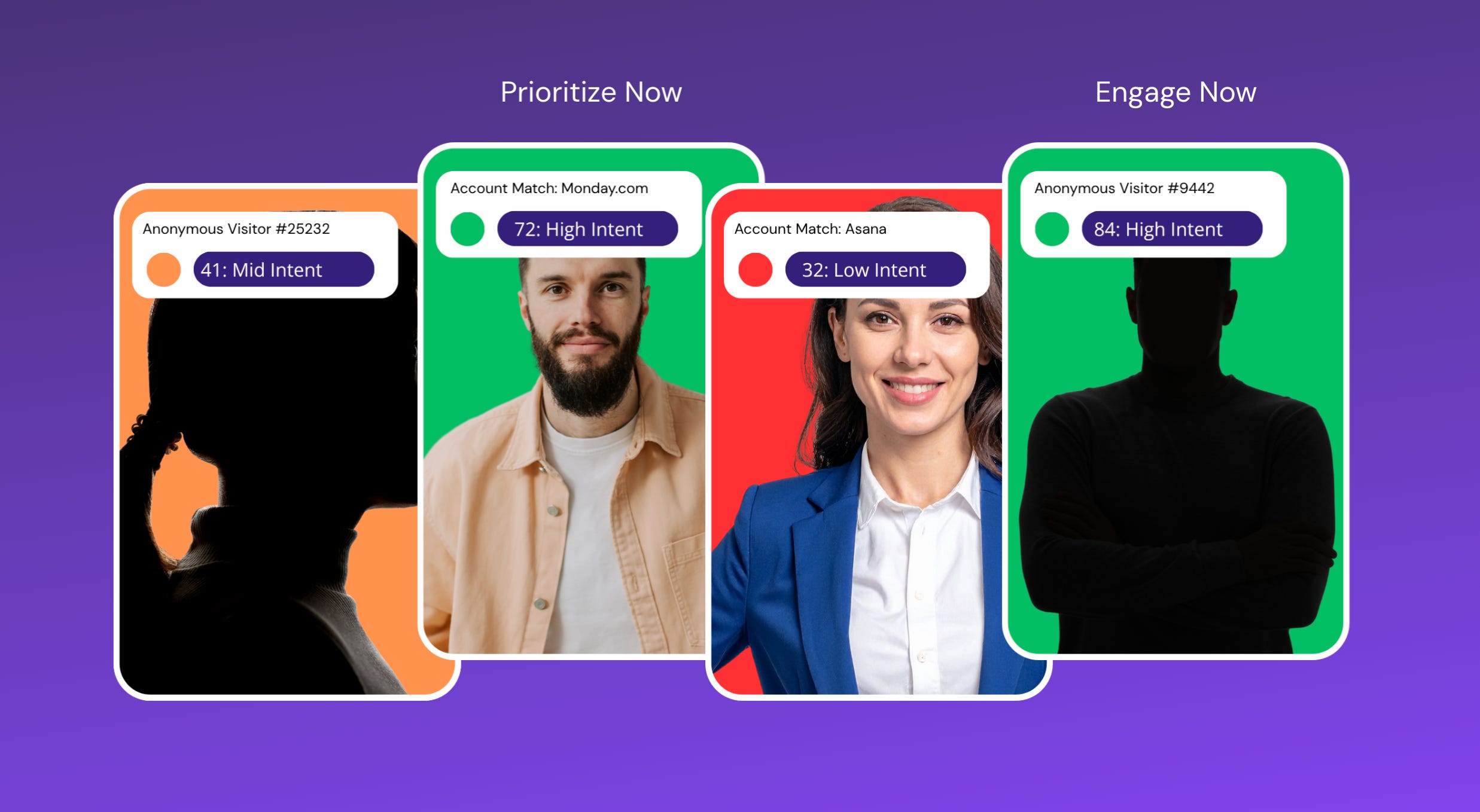
Step 2: Separate curiosity from commitment
Not every visitor who clicks around is a buyer. Some are just browsing, some are researching, and a few are ready to act, all in the same session. Your job is to spot who’s who. You can split most visitors into two groups:
Curious: exploring products, trying to understand your range.
Committed: evaluating specifics before making a decision.
The easiest way to do that is to stop chasing activity and start tracking behavior patterns. Here’s how to tell the difference between casual exploration and buying intent:
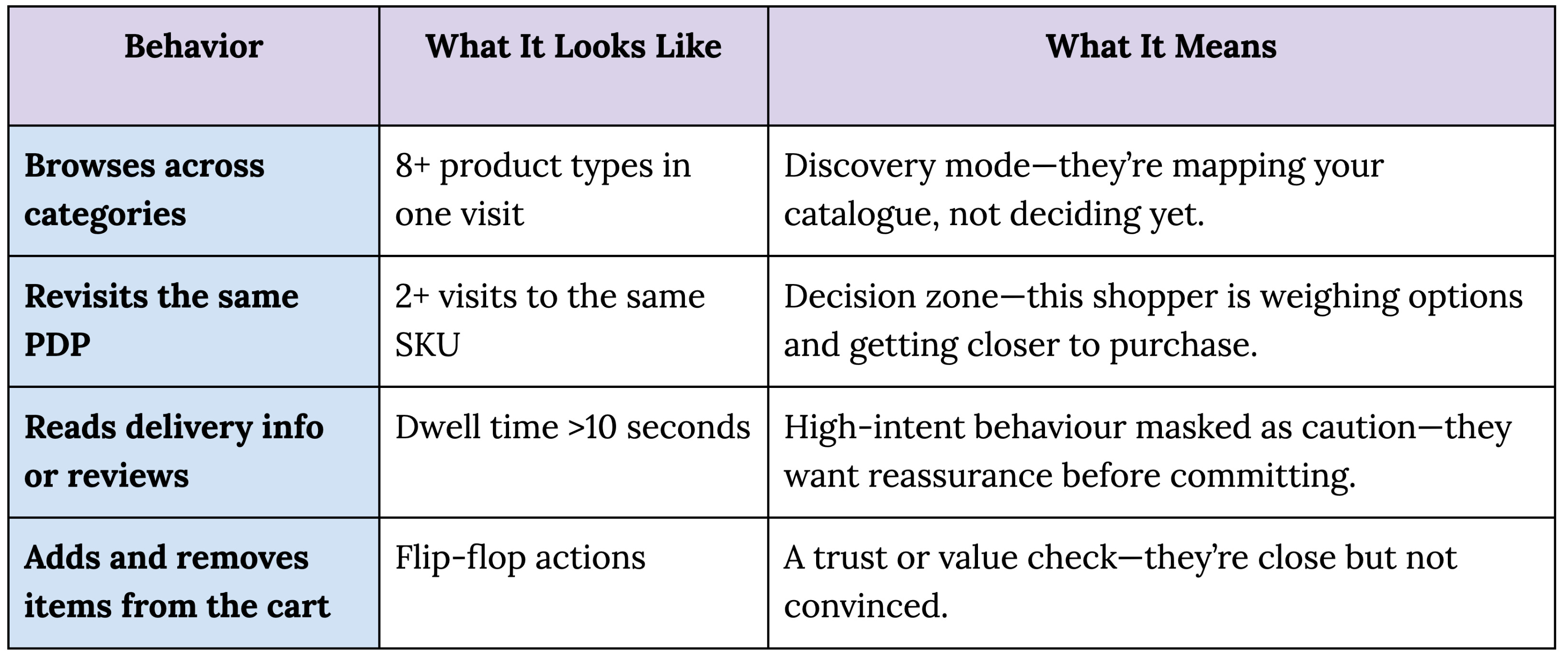
The key is to focus on pattern, not volume. Ten random clicks tell you nothing. One deliberate revisit does. A quick PDP bounce means disinterest; a repeat visit to the same SKU within minutes means you’re seconds away from a sale.
Step 3: Map signals to page zones
Once you know what intent looks like, the next step is knowing where to find it. Every part of your site reveals a different layer of buyer psychology; you just have to read the right cues.
Collection page: Scroll speed, filter or sort usage, and which product tiles actually get clicks tell you if the visitor found something relevant or just skimmed through noise.
Search: Watch for zero-result searches and refinements. If a shopper edits their query instead of leaving, they’re trying to make the site work harder; that’s intent.
Product page (PDP): Time spent on reviews, returns, and variant toggles shows how much confidence they need to complete the decision.
Cart: Add–remove loops, coupon attempts, and delivery checks reveal the final friction points before purchase.
Suppose a shopper lands from an Instagram ad, applies two filters, opens a product, reads reviews for 40 seconds, and switches between sizes. You already have your intent: high intent, low confidence. That’s the point to act: surface delivery time, show size availability, or nudge with social proof.
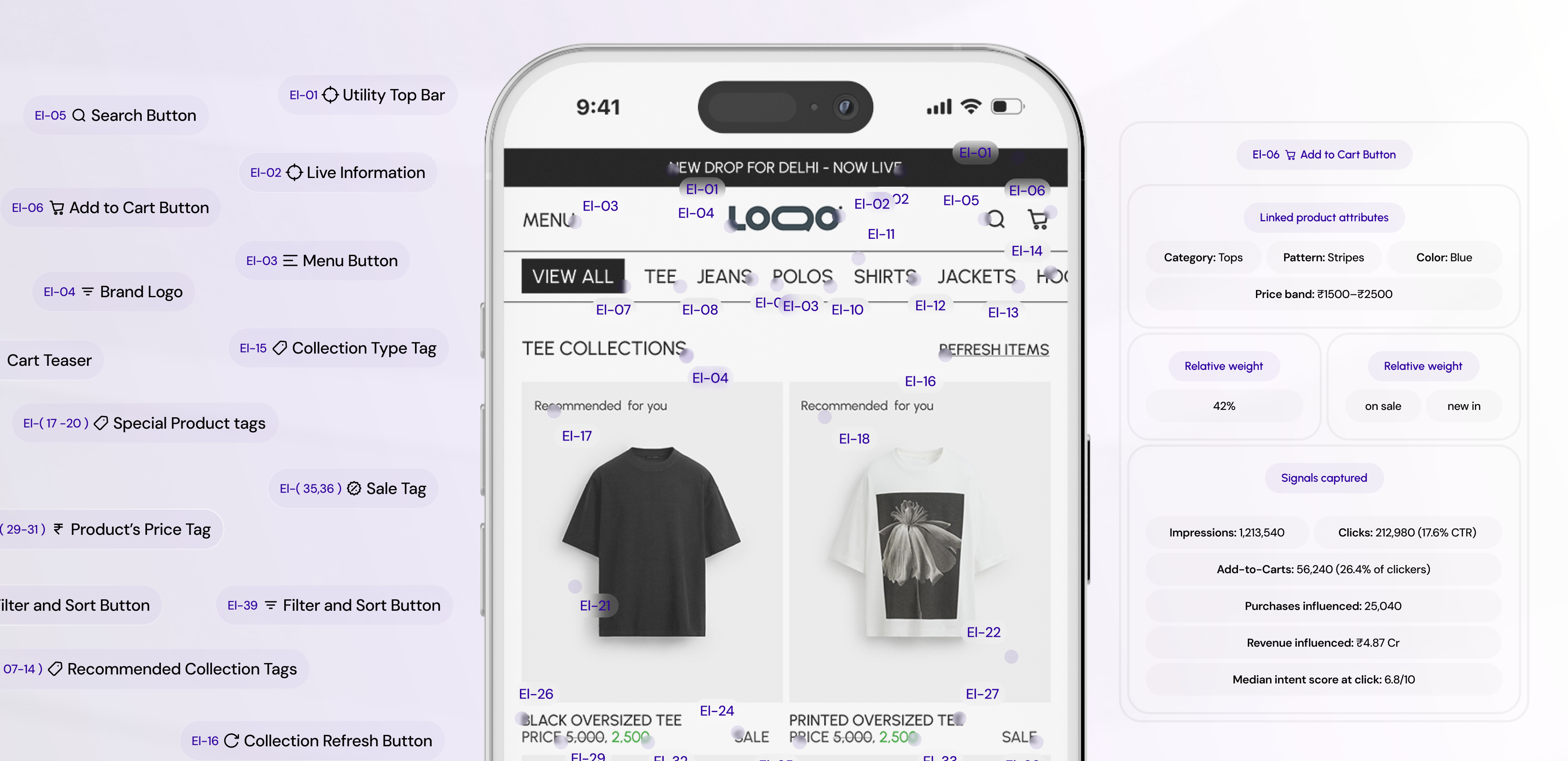
Step 4: Turn signals into action
Intent data means nothing if it just sits in reports. The advantage comes from using it while the shopper is still on-site. Once you know what early buying signals look like, you can act on them in three ways:
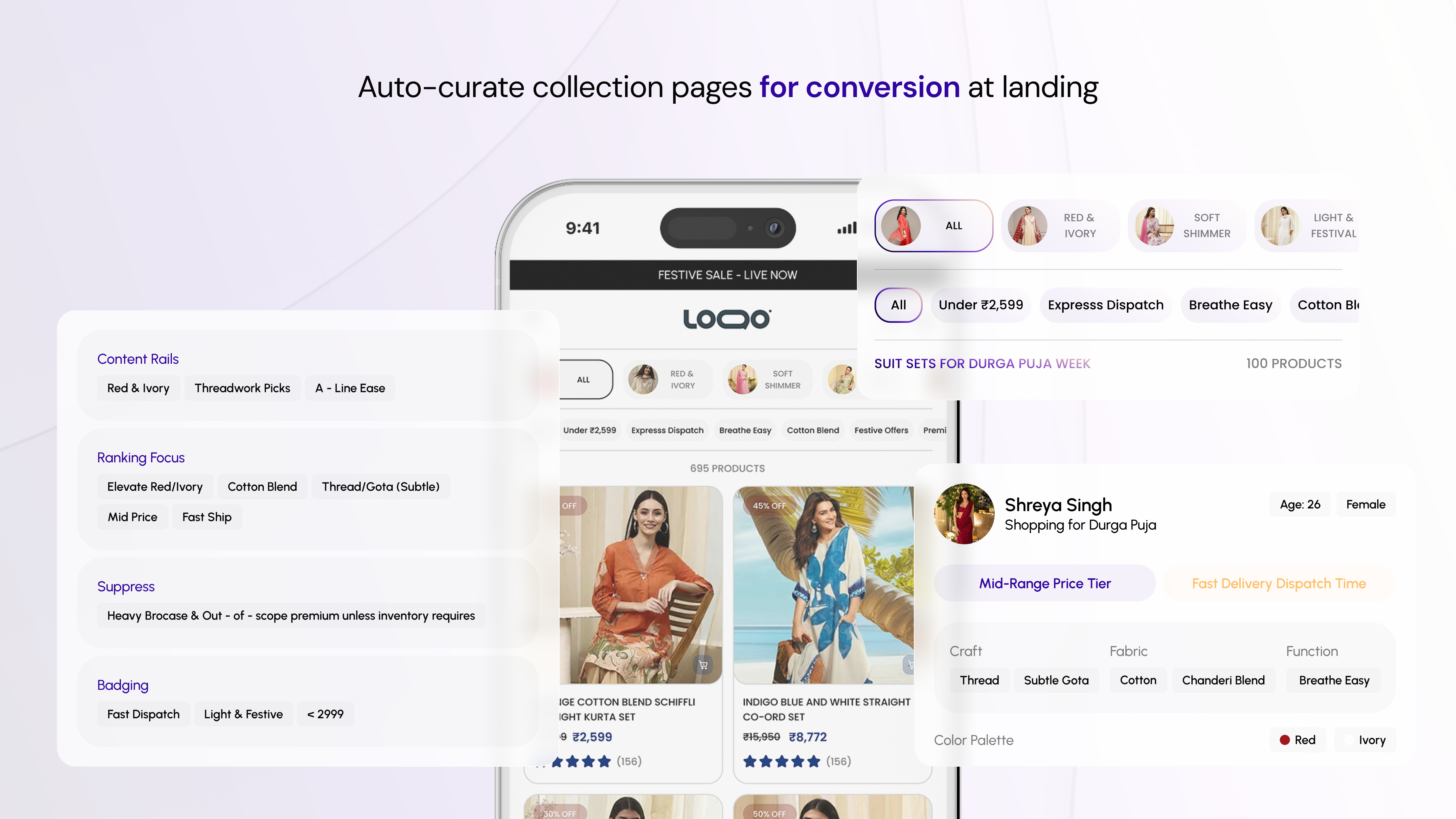
Personalize recommendations
Use behaviour to decide what to show, not just how much. If a shopper spends time on reviews or toggles sizes, they’re looking for confidence, and not more products. Show close substitutes or complementary items that solve their hesitation.
On the other hand, a fast-moving, decisive visitor responds better to bundle suggestions or “complete the look” prompts.
Refine retargeting
Stop chasing everyone who viewed a product. Retarget only sessions that showed real intent: repeated PDP visits, long dwell, or price-band focus.
This is where tools like Helium plays an important role: it captures over 20 live visitor signals, from session velocity to price comfort, and automatically sends intent-qualified audiences to Meta and Google.
That means you spend behind people who were already halfway to buying, not those who just browsed.
Alert merchandising
High-intent sessions that drop off at the same SKU are your biggest missed revenue source. Use those drop-off clusters to flag what’s broken: low stock, poor image order, slow load, or missing size. When intent is there and conversion isn’t, the issue is rarely the user.
Step 5: Build an “intent clarity” layer in your analytics
Most analytics platforms tell you what happened. You need a layer that explains why it happened. Without that, you’ll always be reacting to conversion drops instead of predicting them.
Start with four metrics that define intent clarity:
Decision speed: How fast does a visitor move from category to product?
Evidence density: How many trust elements (reviews, size charts, delivery) do they engage with?
Comfort range: Do they stay within a consistent price or category band?
Trust cues: Do they return to sizing or policy sections before leaving?
Create a lightweight “intent dashboard” that surfaces these behaviors so your team can see where buying decisions stall. Each tile should answer one question:
Who showed intent but didn’t buy?
Where did they drop?
What fix would have mattered in that moment?
The fastest way to lift conversion isn’t by adding features, but by recognizing purchase intent sooner. Once you see how intent unfolds in-session, you stop optimizing pages and start guiding decisions.
Stop waiting for the cart to prove intent
By the time a shopper adds to cart, the outcome is already decided. You’ve either built confidence through the journey, or lost it in silence long before checkout.
The real purchase signals don’t live in your “Add to Cart” metrics. They live in micro-behaviors: a shopper rechecking delivery time, hovering over reviews, or toggling between two variants. That’s where Helium comes in.
Helium’s visitor intelligence layer, tracks over 20 live behavioral signals per session, from decision speed and price comfort to session velocity and trust cues. It reads these actions as intent, not noise, and translates them into live changes: personalized recommendations, smarter retargeting, and alerts for broken SKUs that stall purchase-ready sessions.
Want to see how top brands do it? Book a demo to see how Helium helps them detect and act on intent in real time, turning browsing sessions into buying decisions, one signal at a time.